Peregovorka (ToshaStream): streaming server and team voice chat
our own product in production, version 1.50.0: voice, chats and a private stream
The task
The earlier setup was a bare nginx-rtmp with no configuration: the stream dropped from time to time, and anyone who knew the address could connect to the stream or even publish to it. There were no roles or closed sessions. Such a setup is as unfit for a work call as it is for a broadcast.
What was needed was a closed platform for a small circle of people: voice channels, text chats and, when needed, a live stream of gameplay from a home PC. There were two more conditions. A viewer on a phone over LTE and a viewer on a gigabit line should get different streams, not one compromise. And the service must not endanger its neighbors: the streaming server used to share a machine with the VPN entry node, so any failure of the stream threatened the VPN for every client.
The solution
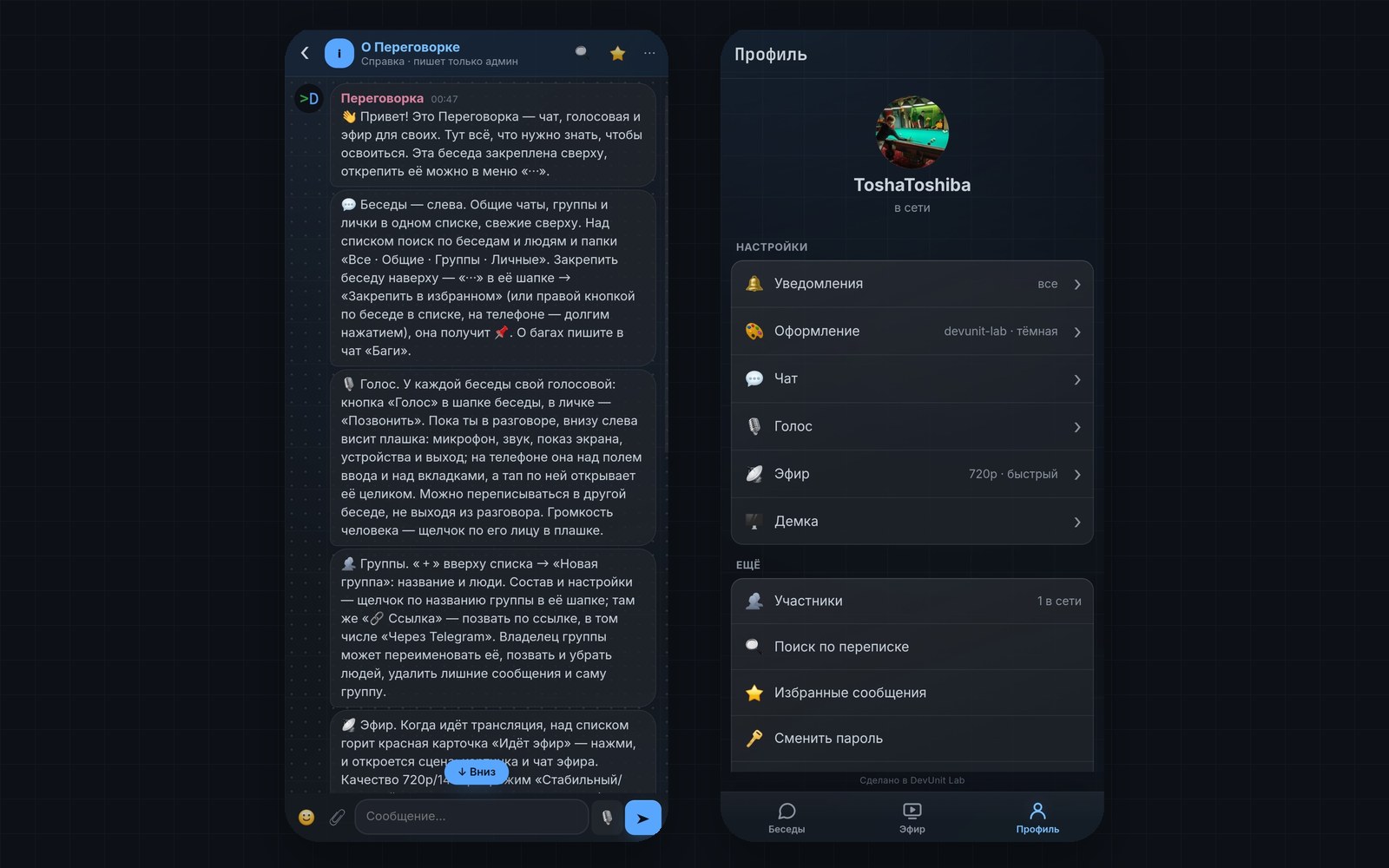
In the repository the product is called “Peregovorka” (Russian for “meeting room”); its earlier name was ToshaStream. It opens in the browser through a secret link, and the stream can also be watched in VLC. The page works in two modes: “Peregovorka” (voice and chats without a player) and “Stream” (player, stream chat and voice side by side). What has been built, per the README and the release log:
- Ingest of the stream over SRT with encryption and a password, plus a backup RTMP ingest.
- Two qualities at once: native 3440×1440 and a lighter 1720×720 for mobile internet.
- Browser viewing over HLS and over WebRTC (WHEP) with under a second of latency, and viewing in VLC over RTSP and SRT.
- Voice on a WebRTC mesh with our own TURN: three shared channels, calls in private conversations, groups, and a “voice only” mode.
- Screen sharing through the server: 1080p, 30 frames per second, up to 18 Mbit/s.
- Chats: three shared ones, private ones, groups and a stream chat; reactions, replies, polls, pinning, search, link previews, attachments and voice messages.
- Guest, member, admin and direct-messages-only roles, time-limited accounts, a sign-in journal and a “sign out everywhere” button.
- Push notifications to each device without duplicates, and a per-conversation mute.
- A nightly database snapshot, container health checks and an automatic restart of a stuck service.
How it works
SRT instead of RTMP
SRT (Secure Reliable Transport) is a video transport protocol over UDP that re-requests lost packets. The stream from the streamer's PC reaches the server over SRT with a password and an encryption key. RTMP is kept as a backup ingest. The server itself does not re-encode video, so the quality of the stream depends entirely on the settings on the gaming PC; the OBS setup guide is kept separately.
Two stream qualities without re-encoding on the server
Both streams, 3440×1440 and 1720×720, are encoded by the graphics card on the PC, and the server only distributes them. The only thing that is re-encoded is the audio track, converted to AAC for Safari, which costs a few percent of one CPU core. The flip side: with the PC off, neither stream exists.
Viewing: HLS for stability, WHEP for speed
HLS (video streamed in segments) gives 6 to 8 seconds of latency but tolerates an unstable mobile network, and it lets you rewind about 16 seconds (8 segments of 2 seconds each). WHEP is a way to receive the stream over WebRTC with under a second of latency. The viewer picks between the regular mode and a “fast” one. Chrome, Edge and Safari play the 1440p browser stream, and Firefox gets 720p in H.264.
Voice on a WebRTC mesh with our own TURN
A WebRTC mesh means every participant connects directly to every other: voice doesn't pass through the server at all, and the server only introduces participants and relays signalling packets. That gives latency in the tens of milliseconds and almost no server load. The price is that everyone sends their voice to everyone, so the limit is deliberate: 10 people per channel. TURN is a relay for people who can't connect directly. coturn uses temporary credentials valid for an hour, the secret never leaves the server, and the relay cannot decrypt a conversation.
Private access: auth_request in nginx and roles
Every request to HLS, WHEP and audio goes through auth_request: before serving, nginx asks the service whether the person is signed in. External players like VLC use a separate secret. Roles live in the database and are changed from the admin panel on the fly, without a restart or dropping anyone's call. The direct-messages-only role sees a single conversation with the admin: shared chats, channels, the stream and other people's names are closed to it on the server. State-changing requests are accepted only as POST with a Sec-Fetch-Site check.
Chats, voice messages and history
Chat history is stored in SQLite and survives a restart. A voice message is recorded straight from the input field (up to 5 minutes), and the server transcodes it to mp3 with ffmpeg so that iPhone, Android and desktop can all play it. Links get a preview built by the server, protected against SSRF: internal and private addresses are never resolved. Notifications don't duplicate: while a person reads a chat on one device, pushes don't go to any of their others.
Service resilience
Containers answer health checks, and the chat answers /healthz, which reads from and writes to the database. A watchdog timer restarts a stuck container within a minute, but no more than three times an hour. The database is snapshotted nightly, and a separate machine collects the snapshots and verifies a restore; a failure arrives as a Telegram message. The service runs on its own machine, so it cannot bring the VPN down.
Results
- Viewer latency under a second over WHEP, 6 to 8 seconds over HLS.
- Up to 10 people per voice channel, connected directly, with no load on the server.
- Work calls and broadcasts run on our own infrastructure, without third-party messengers.
- Chat history is kept for 90 days and survives a restart.
- Voice is end-to-end encrypted between browsers.
Technologies and why
- Go: the chat, accounts, roles, voice signalling and viewer counter service.
- MediaMTX: SRT ingest and HLS, WHEP and RTSP delivery.
- WebRTC and coturn: voice directly between participants and our own TURN.
- SQLite: accounts, messages and read state.
- nginx: the HTTPS entry and an access check on every request.
- Docker Compose: starting the services with CPU and memory ceilings.
Status
Version 1.50.0, released on September 29, 2026; in production, our own product. The README calls it by its working name, “Peregovorka”; internal names of paths and streams remain the earlier ones for now.
Known limitations per the README: the text chat is not end-to-end encrypted, so anyone with root on the machine can read it; access to the stream is limited by account but not by role; group voice is a mesh, not an SFU, so more than 10 people per channel would need a different design; stream recording is currently switched off, and turning it back on should go together with a configured rotation. Planned: verify the stream after the SRT latency fix, put the Telegram account-management bot through its paces, and change the SRT publishing password.
Questions about this project
Why SRT instead of RTMP, and how does it prevent drops?
What is the latency of the stream in the browser?
Can the server hear voice calls?
Can work calls and chats run on our own server instead of a cloud messenger?
What data is stored and who can access it?
Can this be deployed for another team?
More in this area
VPN infrastructure: Russian entry node, European exit
our own product: a relay in Russia, a persistent tunnel and a node in the Netherlands
Corporate gateway on Xray and nginx for an IT team
for an IT company: work tools available again, on its own servers
A private server for several websites on Docker and nginx
our own product: site isolation, HTTPS, self-hosted mail and backups
Need something similar?
Tell us about the task — we'll show how we solved it and estimate the scope.